Processing invoices using Jev and LangGraph
The goal is to create a pipeline to process invoice documents, extract data and add it to our financial administration using various models and LangGraph.
Tools and frameworks
For the prototype I’ve chosen to run Node.js + MariaDB on the server side of things, complemented by Express.js and React to facilitate a lightweight UI to upload documents.
BullMQ will handle the scheduling and processing of tasks. The main programming language will be TypeScript.
Docling for preprocessing documents to markdown, this saves us from sending the complete file to an LLM, which would cost more tokens, and it’ll allow us to add extra steps before extracting invoice data.
LangGraph to connect to various models and manage agentic loops, and LangSmith for the AI agent observability and costs per processed document.
Models used:
Approach
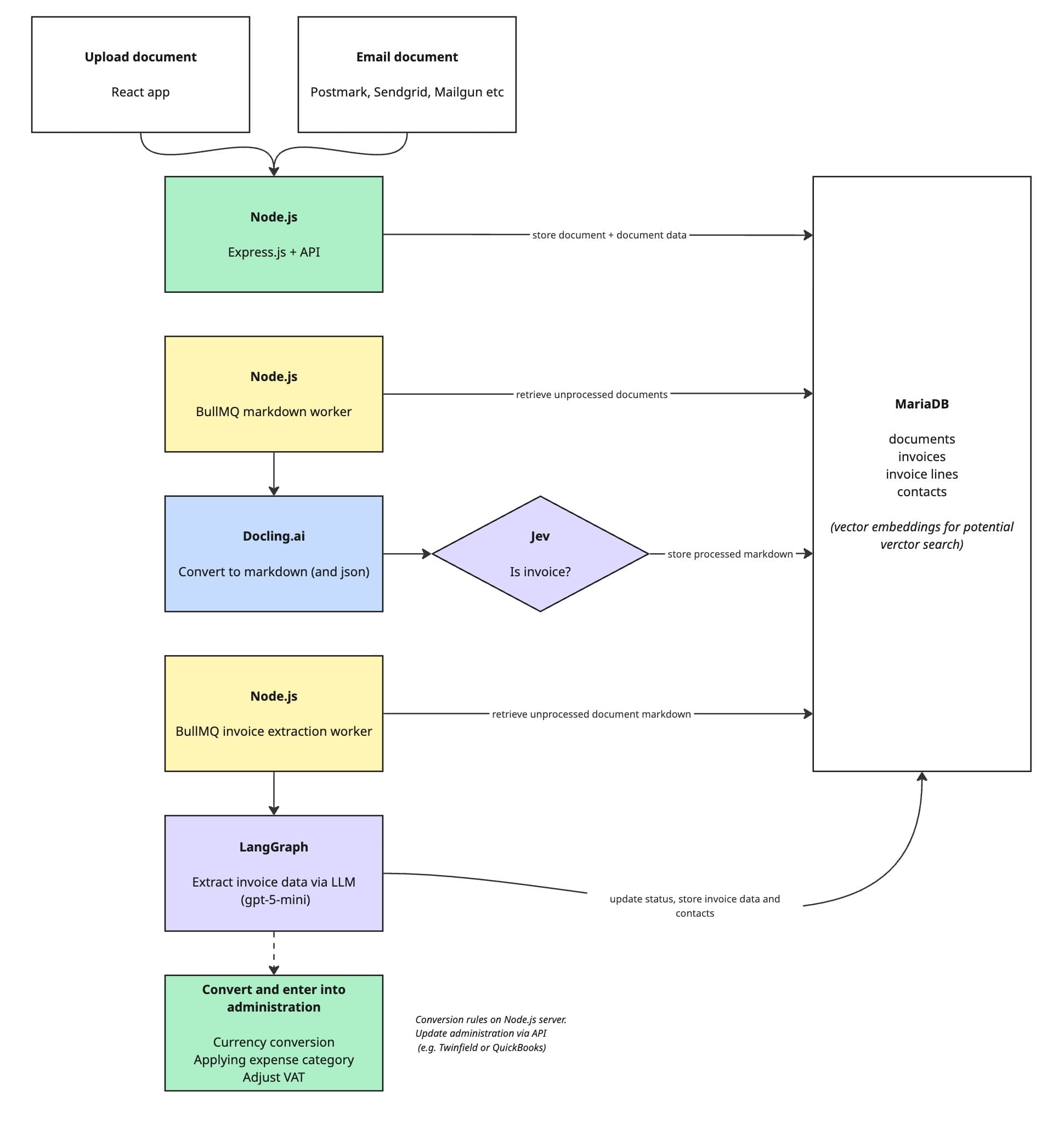
There are 4 steps when processing invoices:
- Ingesting documents
- Parsing documents to markdown with Docling
- Extracting structured invoice data using an LLM and validate response
- Converting and applying data to financial administration
Step 1: Ingesting documents
Perhaps the easiest step. A form can be used to upload one or more documents, the server validates them by checking the file type and size before storing them (locally or on a CDN).
The server will then create a new Document entry in the database with details like: original filename, stored file name (used for retrieving the document), mime type, file size, upload date.
A job will be scheduled for our “markdown worker” (Step 2).
Step 2: Parsing the document + pre-validation
Now we can prepare the document for information extraction. We’ll use Docling as it will process the documents to markdown (and json), but it will also keep the document structure intact, providing higher quality context for the LLM(s) to work with.
Once we have the markdown version of the document we can first check if it is actually an invoice. We’ll use Jev from TypeSafe to classify the document. If it is not an invoice, receipt or other document relevant for our financial administration, don’t process it.
Once we have the markdown, we’ll store it in our database and associate it with the document entry. We’ll then schedule a job for our “invoice extraction worker” (Step 3).
Step 3: Extracting structured invoice data
Now we can prompt an LLM to extract the invoice data we need. We want structured data back, so we’ll prompt the model to return a structured InvoiceSchema.
The schema
import { z } from "zod";

const AddressSchema = z.object({
    street: z.string().nullable(),
    postalCode: z.string().nullable(),
    city: z.string().nullable(),
    country: z.string().nullable(),
});

const BankAccountSchema = z.object({
    iban: z.string().nullable(),
    bic: z.string().nullable(),
});

export function makePartySchema() {
    return z.object({
        name: z.string().nullable(),
        contactName: z.string().nullable(),
        website: z.string().nullable(),
        email: z.string().nullable(),
        phone: z.string().nullable(),
        vatNumber: z.string().nullable(),
        cocNumber: z.string().nullable(),
        address: AddressSchema.nullable(),
        bankAccount: BankAccountSchema.nullable(),
    });
}

const SupplierSchema = makePartySchema();
const CustomerSchema = makePartySchema();

const LineItemSchema = z.object({
    description: z.string(),
    category: z.string().nullable(),
    quantity: z.number(),
    unitPrice: z.number().nullable(),
    amount: z.number(),
    vatRate: z.number().nullable(),
});

const VatBreakdownSchema = z.object({
    rate: z.number(),
    taxableAmount: z.number(),
    vatAmount: z.number(),
});

export const InvoiceSchema = z.object({
    documentType: z.literal("invoice"),
    currency: z.string(),
    language: z.string().nullable(),
    supplier: SupplierSchema,
    customer: CustomerSchema,
    subject: z.string().nullable(),
    invoiceNumber: z.string(),
    purchaseOrderNumber: z.string().nullable(),
    reference: z.string().nullable(),
    invoiceDate: z.string().nullable(),
    dueDate: z.string().nullable(),
    paymentTerms: z.string().nullable(),
    lineItems: z.array(LineItemSchema),
    vatBreakdown: z.array(VatBreakdownSchema).nullable(),
    subtotal: z.number(),
    tax: z.number(),
    total: z.number(),
    metadata: z
        .object({
            pages: z.number().nullable(),
            confidence: z.number().nullable(),
            country: z.string().nullable(),
        })
        .nullable(),
});

export type Invoice = z.infer<typeof InvoiceSchema>;
The invoice extraction
import { ChatOpenAI } from "@langchain/openai";
import { HumanMessage } from "@langchain/core/messages";
import { InvoiceSchema } from "../schemas/invoice_schema.js";
import { ownCompanyObjectsForPrompt } from "../companyNames.js";

const OPEN_AI_MODEL_ID = "gpt-5-mini-2025-08-07";

function buildExtractionPrompt(documentKind: "Markdown" | "JSON"): string {
    return `## Your task
Extract all available invoice information from the following ${documentKind} document.
The ${documentKind} represents a purchase invoice, a sales invoice or receipt. Return a
single structured JSON object.

Pay attention to: dates, currency, line items, totals, tax, payment info, discounts,
shipping costs, supplier details, customer details, references and language of the
document.

The information of my company is one of the following: ${ownCompanyObjectsForPrompt()}.

## Rules
- Return all dates in ISO 8601 format (YYYY-MM-DD)
- Return language as ISO 639-1 format (e.g. "en" for English)
- If a date is not present or cannot be determined, return null — never an empty string.
- Return IBAN, Chamber of Commerce and VAT numbers and phone number without any blank
  spaces, dots or other separators
`;
}

export const extractInvoice = async (file_data: any) => {
    const model = new ChatOpenAI({ model: OPEN_AI_MODEL_ID });
    const structuredModel = model.withStructuredOutput(InvoiceSchema);

    return await structuredModel.invoke([
        new HumanMessage({
            content: [
                {
                    type: "text",
                    text: buildExtractionPrompt("Markdown"),
                },
                ...file_data,
            ],
        }),
    ]);
};
Validating
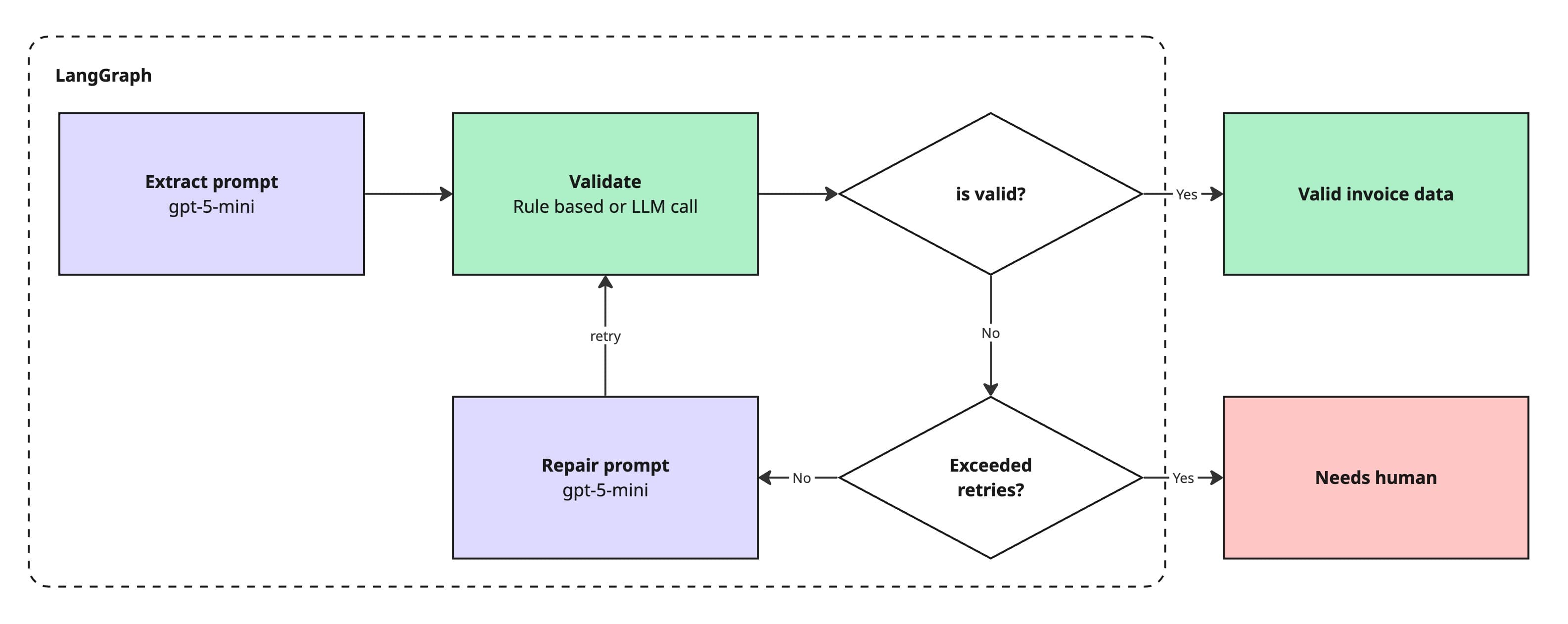
Next is arguably the most important step: validation. Without supplier history we can never be 100% sure the result is accurate (more on that later), but we can check whether the numbers add up.
Notice we ask for each line item’s amount and VAT rate, as well as the total VAT amount per bracket and invoice total. We can use these numbers to check whether the line items include VAT: totals from all line items = invoice total. If this is not the case, try adding the totals of line items + subtotals per tax bracket, and compare it to the invoice total.
There are more scenarios we can build in, but let’s assume if none of the crosschecks pass, it is highly likely the invoice extraction failed. In that case we can try to repair the returned response by building a “repair” prompt and specifying where the crosschecks fail.
You can also ask an LLM to validate the response, but an LLM can hallucinate there too and costs tokens, so rule-based logic is still the better choice.
Repair prompt
export interface RepairOutcome {
    invoice: Invoice | null;
    failureReason: string | null;
}

export async function repairInvoice(
    markdown: string,
    validationMessage: string,
): Promise<RepairOutcome> {
    const response = (await repairModel.invoke([
        new SystemMessage(REPAIR_SYSTEM_PROMPT),
        new HumanMessage({
            content: [
                { type: "text", text: `Validation problem: ${validationMessage}` },
                { type: "text", text: `Original document — markdown:\n${markdown}` },
            ],
        }),
    ])) as AIMessage;

    const toolCall = response.tool_calls?.[0];

    if (!toolCall) {
        return { invoice: null, failureReason: "Agent did not call a tool" };
    }

    if (toolCall.name === "cannot_repair") {
        const reason = (toolCall.args as { reason?: string })?.reason
            ?? "Agent declined to repair the invoice";
        return { invoice: null, failureReason: reason };
    }

    const parsed = InvoiceSchema.safeParse(toolCall.args);

    if (!parsed.success) {
        return {
            invoice: null,
            failureReason: `Agent returned invalid invoice data: ${parsed.error.message}`,
        };
    }

    return { invoice: parsed.data, failureReason: null };
}
Step 4: Converting and applying data to financial administration
Once the extracted data passes validation, we still need to process the raw invoice data so we can add it to our financial administration, think of:
- Currency conversion
- Expense categories
- Capital Expenditures
- Intra-Community transactions declaration
Currency conversion is best handled by calling an external api like frankfurter.dev, and using the invoice date as reference. Keep in mind that this can deviate from the actual bank transaction (transaction date can differ, the exchange rate can differ).
Categorising the expense categories can also be done by using an LLM, or perhaps even Jev, on line items basis or the whole invoice, but it is also wildly dependent on how descriptive the invoice is. I recommend using the historical data to apply these categories, so once a category has manually been applied to an invoice from a specific supplier, we can likely apply it to every succeeding invoice. Mind you, there are always exceptions where invoices can contain mixed categories.
Potential capital expenditures can be flagged if a line item exceeds 450 euros (Netherlands) and if the description of the line item is good enough to run a rule check (Jev).
Intra-Community transactions (ICP) can be deduced from the supplier VAT number.
Use historical data to improve the process
As briefly mentioned before, the more historical data we have, the better we can fully automate the process.
For instance, we can use the supplier details and/or bank transaction information to retrieve related invoices from the database and check whether the invoice details (like description) are similar, and if so, check if we can apply the same expense categories or make the description consistent between similar invoices.
Costs and timings
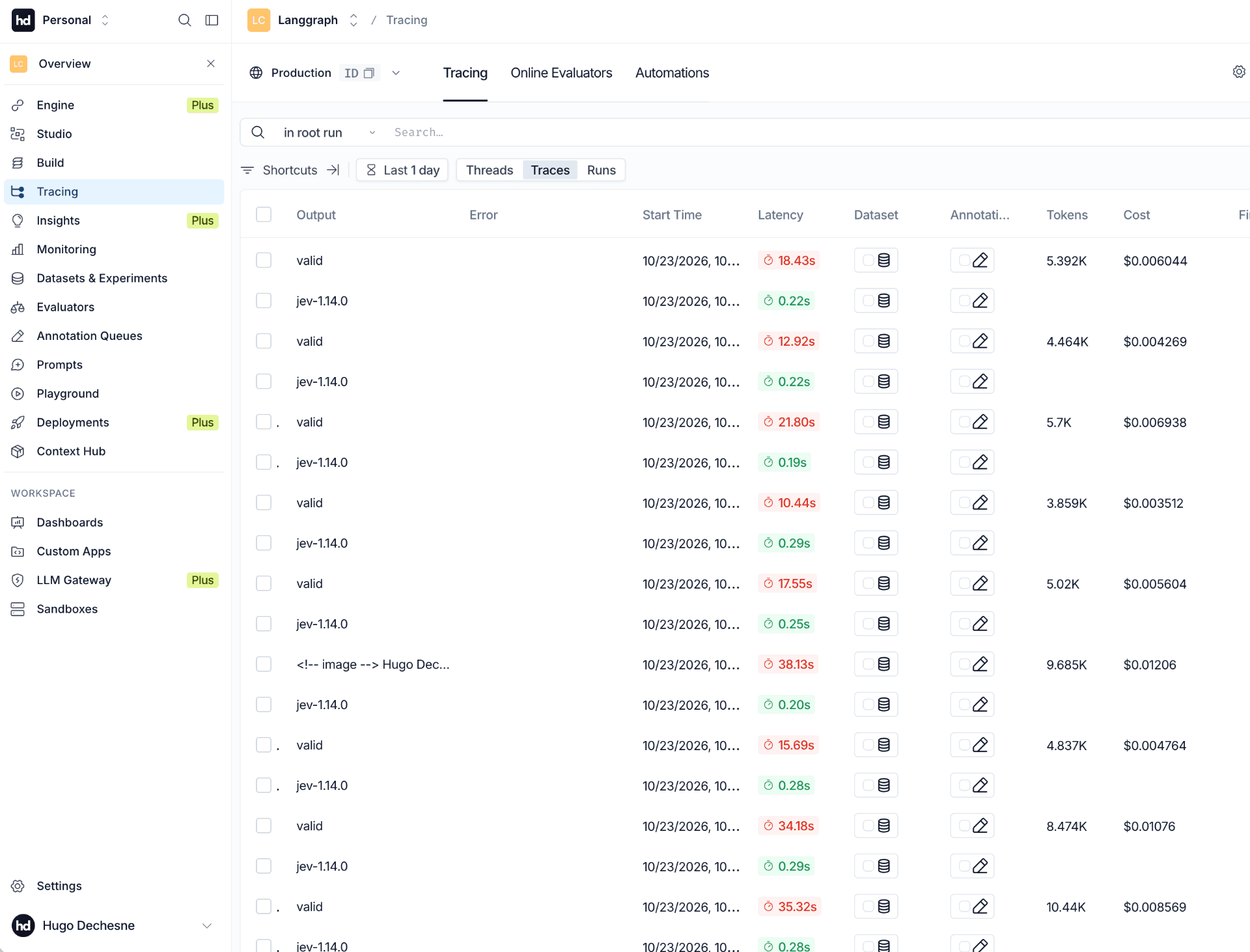
When inspecting the traces in LangSmith, we’ll see that processing one invoice costs around$0.006 if the model only requires the extract and validate steps, and about double if one repair step is necessary.
Duration for executing the graph averages around 20 seconds, which is too long to supply the user with feedback in the same session, and I recommend creating an async user experience to decouple the uploading of the documents, and the processing.
Key take aways
- Fail early to prevent unnecessary token usage.
- Costs matter, it doesn’t make sense to spend 10 cents on processing an invoice.
- Don’t ask too much of an LLM at once. For instance, don’t ask it to extract the invoice data while simultaneously applying specific tax rules to that data for direct injection in the administration. This will increase the chance of hallucinations.
- Save each step so you can trace back and analyse where the model needs tweaking. Save the raw document, save the markdown, save the raw extracted invoice data and finally save the entry in the administration.
- Use rule based logic where possible, it is faster and cheaper.
Wrap-up
Having implemented a similar process at Kees de Boekhouder and Founders, I’m familiar with the intricacies and wild variety of documents out there. Some have discounts as line items, some lack information, some have their address embedded in an image instead of plain text, some have strange layouts, etc. But overall the majority of the raw invoice data can be extracted without much trouble; it mostly comes down to cross-checking subtotals against totals.
The real challenge is the step where it needs to be added into the financial administration. Which expense category? Which VAT type? Is the supplier based abroad? Is it a capital expense? How do we handle currency conversion? etc. This will, in most cases, require some human intervention if there is no prior history available, and there will always be some cases that require some tweaking or adding a new route to LangGraph.
It is also important to factor in the costs per processed document. I know a more cutting-edge model will likely give better results, but $0.10 per invoice doesn’t make sense. $0.006 does, even if we occasionally throw a better model at a repair.
All in all it is easy to get something going quickly, but as with many things in software development, the devil is in the details.